
Dynmap
DynMap
Inhalt
- DynMap
Vorwort
Wenn man ChatGPT bittet, "ein Vorwort für eine technische Dokumentation zu dem Minecraft Plugin DynMap welches wie ein Google Maps für Minecraft ist" zu schreiben, ist das Ergebnis ernüchternd:
"Herzlich willkommen zur technischen Dokumentation von DynMap – dem Minecraft-Plugin, das deine Spielwelt in einem Format ähnlich wie Google Maps präsentiert. Dieses innovative Tool ermöglicht es Serveradministratoren und Spielern gleichermaßen, ihre Minecraft-Umgebung detailliert zu visualisieren und zu erkunden. In diesem Handbuch finden Sie umfassende Informationen zur Einrichtung, Konfiguration und Nutzung von DynMap, um sicherzustellen, dass Sie das Beste aus diesem leistungsstarken Plugin herausholen können. Tauchen Sie ein in die Welt von DynMap und entdecken Sie, wie Sie Ihre Minecraft-Erfahrung durch ansprechende Karten und benutzerfreundliche Funktionen bereichern können."
~ generiert von ChatGPT
Im Kern richtig, ansonsten viel Müll.
Die DynMap erreicht ihr übrigens unter map.mc.heyjoshiii.de
Funktionsweise
DynMap(c) ist ein Plugin, welches tatsächlich vergleichbar mit Google-Maps ist. Es kann die Chunks, welche von Spielern besucht wurden rendern und in 2D sowie in 3D darstellen. Dazu nutzt die DynMap spezielle Trigger um zu erkennen, ab wann Blöcke/Chunks vom Spieler geladen wurden. Wird einer der Trigger ausgelöst, wird der entsprechende Block oder die entsprechenden Blöcke in eine Queue zum Rendern geschoben.
Die DynMap rendert mit den folgenden Triggern: (# sind in der Konfiguration auskommentiert und somit nicht aktiv)
- #playermove (Jedes Mal wenn ein Spieler über einen Block läuft,
wirdwerdendieserdiese Blöcke in die Render-Queue geschoben) - #playerjoin (Jedes Mal wenn ein Spieler joined, werden alle
BlöckeChunks um den Spielerim Chunkder Render-Queue hinzugefügt) - blockplaced (Jedes
malMal wenn ein Spieler einen Block platziert,wirdwerdendieserdiese Blöcke in die Render-Queue geschoben) - blockbreak (
)Jedes Mal wenn ein Spieler einen Block zerstört, werden diese Blöcke in die Render-Queue geschoben) - leavesdecay (
)Jedes Mal wenn Blätter zerstört werden, werden diese Blöcke in die Render-Queue geschoben) - blockburn (
)Jedes Mal wenn ein Block verbrannt ist, werden diese Blöcke in die Render-Queue geschoben) - #chunkgenerated (
)Jedes Mal wenn ein Chunk zum ersten Mal generiert wird, werden diese Blöcke in die Render-Queue geschoben) - blockformed (
)kein Eintrag in offizieller Documentation) - blockfaded (
)kein Eintrag in offizieller Documentation) - blockspread (
)kein Eintrag in offizieller Documentation) - pistonmoved (
)Jedes Mal wenn ein Piston aktiviert wird, werden diese Blöcke in die Render-Queue geschoben) - explosion (
)Jedes Mal wenn eine Explosion ausgelöst wurde, werden diese/betroffene Blöcke in die Render-Queue geschoben) blockfromto#blockfromto ("Dynmap will trigger an update for block a player moves onto. This only happens when a new block is moved onto as opposed to playermove which can happen multiple times in the same block.")- blockphysics (kein Eintrag in offizieller Documentation - vermutlich wird jedes Mal wenn ein Block MC-Physik erfährt, werden diese Blöcke in die Render-Queue geschoben )
- structuregrow (
)kein Eintrag in offizieller Documentation) - blockgrow (
)Jedes Mal wenn ein Block ein Grow-Event triggert, werden diese Blöcke in die Render-Queue geschoben) - #blockredstone ("If enabled, Dynmap will mark all tiles that have redstone updates to be updated. This setting can cause severe performance penalties on servers with large redstone contraptions and can be abused by players. It is not normally recommended." - aka einfach nein)
Ebenso kann es zur Navigation und Orientierung genutzt werden, da es Spielerpositionen anzeigen kann und wichtige Orte per Pin/Marker markiert werden können.
Einen Account anlegen - Registrierung
Wenn ihr auf der Login-Seite der DynMap gelandet seid, habt ihr quasi schon alle Schritte die ihr für die Anleitung braucht.
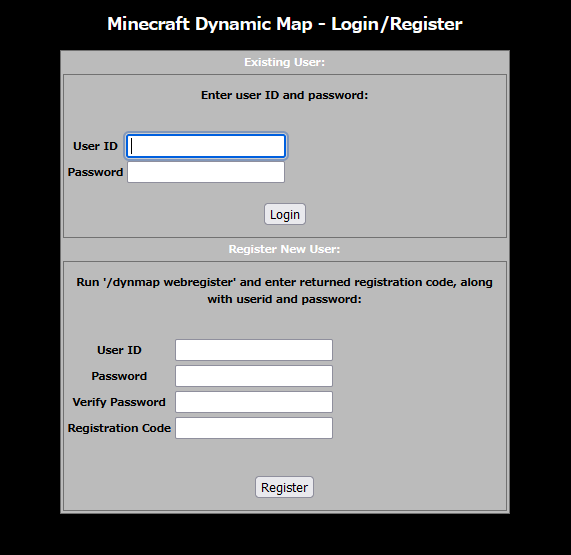
Hier aber zur Sicherheit die Schritt-für-Schritt-Anleitung:
- Starte dein Minecraft und verbinde dich mit dem Server!
- Gehe in das Portal, welches dich zum CommunityServerSMP führt!
- Gebe im Chat
/dynmap webregister <userID>ein! - Du erhältst nun alle Informationen - im Chat das sollte ungefähr so aussehen:

- Wechsel nun zum Browser und gebe deine UserID sowie dein Wunschpasswort ein. Merke dir dein Passwort gut! Ein Passwort-Reset ist nicht einfach so möglich, sondern muss von Admins durchgeführt werden.
- Gib nun Anschließend den Registrierungscode aus dem Chat ein!
- Drücke auf "Register"!
- Glückwunsch! Dein Account wurde erstellt.

Das UI
Um die DynMap richtig bedienen zu können muss man natürlich wissen wie man sich auf der Benutzeroberfläche zurecht findet.
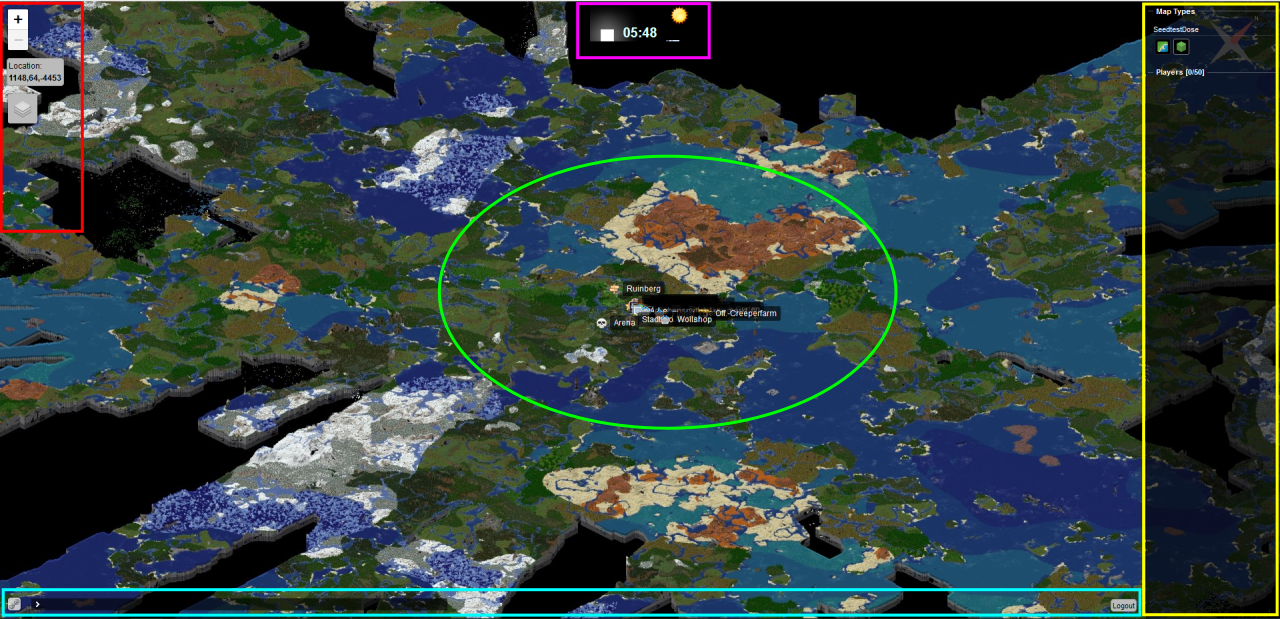
- rote Region: Ansichtssteuerelemente
- pinke Region: Zeitinformationen
- gelbe Region: Navigationsmenü
- grüne Region: Hauptbedienfläche
- blaue Region: Misc
Rote Region (linke Seite)
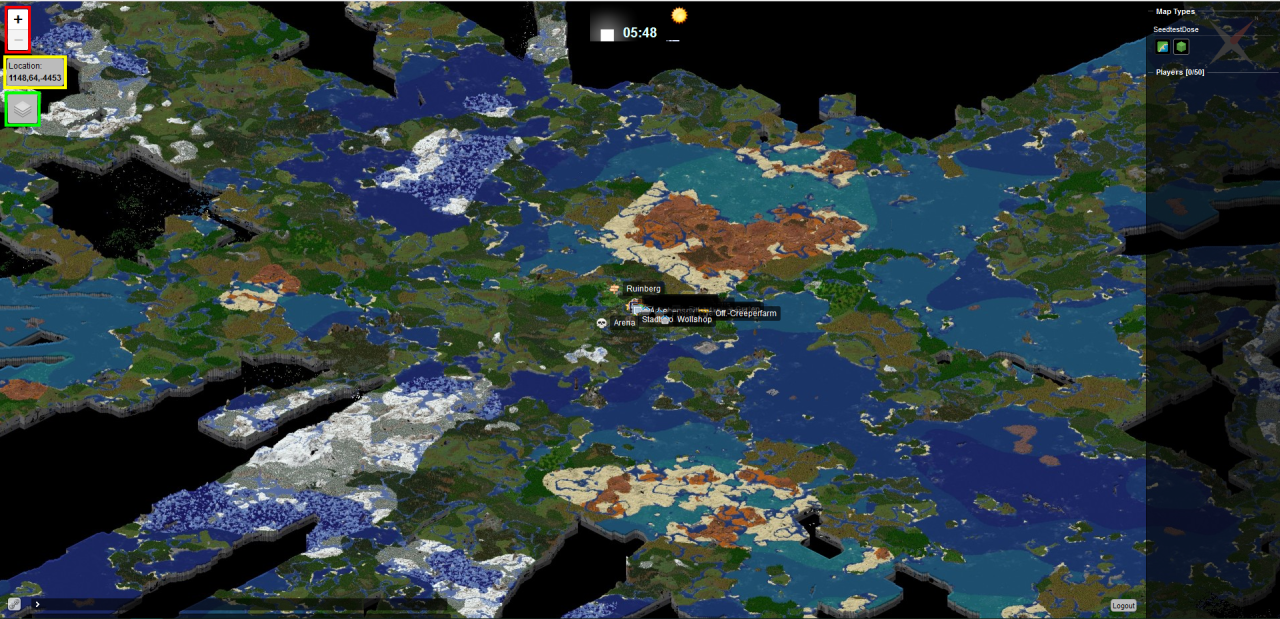
- rot: Einstellen des Zoom-Level (kann alternativ auch mit dem Mausrad oder mit dem üblichen Zwei-Finger-Bewegung genutzt werden)
- gelb: detaillierte Weltkoordinaten Anzeige für den Mauszeiger
- grün: Ebenen-Sub-Menü

- Markers: Schaltet die Ortsmarkierungen ein/aus
- Players: Schaltet Spielerpositionen ein/aus

Pinke Region (obere Seite)
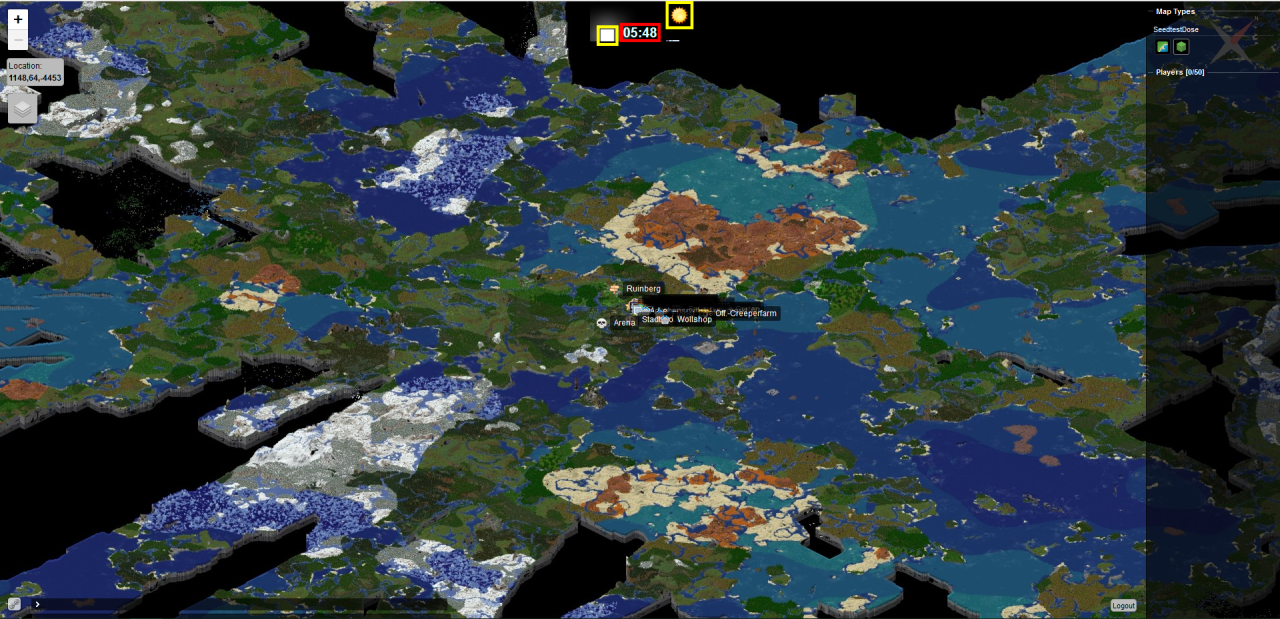
- rot: Ingame Zeit
- gelb: Ingame Mond-/Sonnenphase
Gelbe Region (rechte Seite)
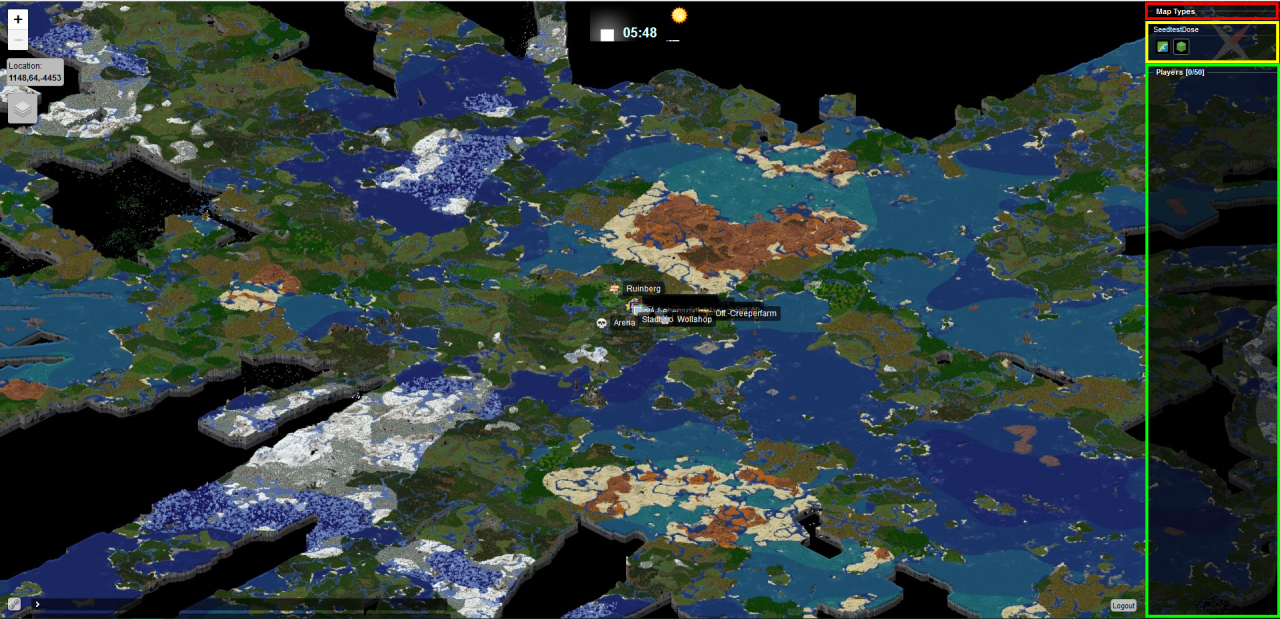
- rot: Auswahl der Dimensionen (Deaktiviert)
- gelb: Ansichtswahl (top-down/3D)
- grün: Spielerwahl (bewegt die Karte zum Spieler)
Grüne Region (Mitte)
Hauptbedienfläche, Navigation mittels Klick & Drag
Blaue Region (untere Seite)
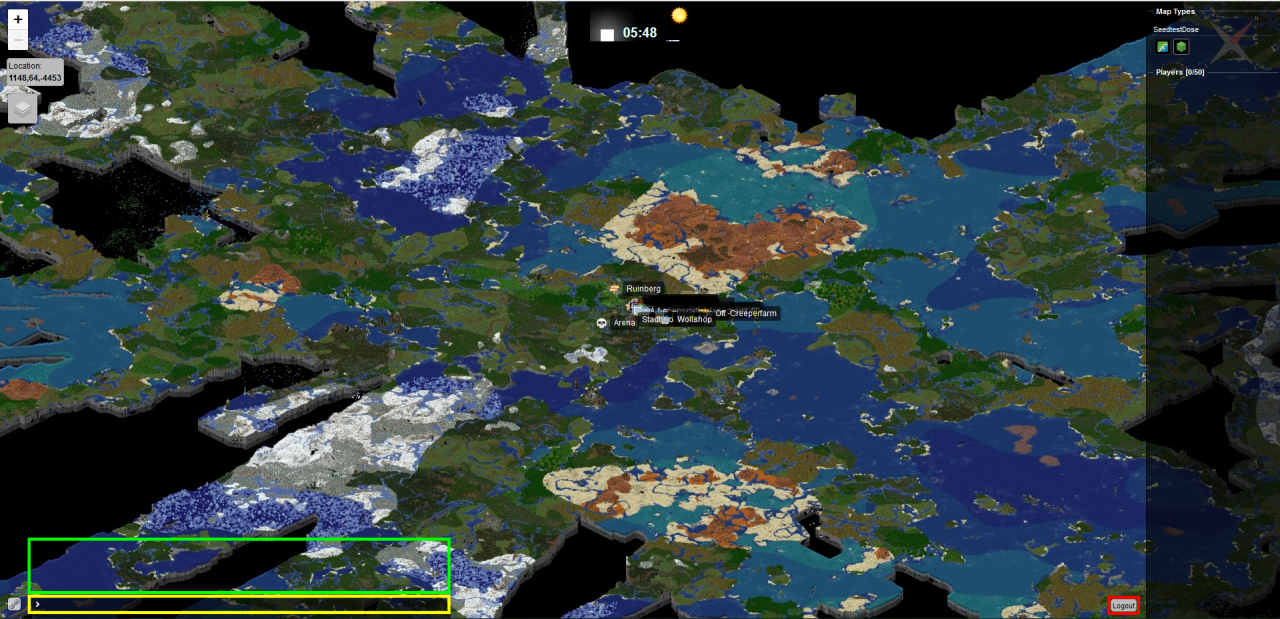
- rot: Logout-Knopf
- gelb: Chat-Zeile
- grün: Chatverlauf
Wichtige Orte / Marker
Die DynMap hat eine neate Funktion um Markierungen, sogenannte Pins/Marker, hinzuzufügen. Als wichtige Orte zähle Orte die eine öffentliche Nutzung vorsehen, markant für die Orientierung sind oder andere Points-of-Interest. Diese werden zur Sicherheit und ein Overcrowding zu verhindern nur von Admins markiert.
Befehl-Referenz
Hiding and showing players
-
/dynmap hide: Hides the player from the map. -
/dynmap hide thedude: Hides the player thedude from the map. -
/dynmap show: Shows the player on the map again. -
/dynmap show thedude: Shows the player thedude on the map again.
Rendering
-
/dynmap render: renders one tile of the map where you are standing. -
/dynmap fullrender: Attempts to render all maps of the entire world from your location (or from the center of that world, if issued from the server console). -
/dynmap fullrender world: Attempts to render all maps of the world named world from the center of that world. -
/dynmap fullrender world:surface: Attempts to render the map named surface for the world named world from the center of that world. -
/dynmap fullrender resume <world>: Resume render of all maps for world . Skip already rendered tiles. -
/dynmap fullrender resume <world>:<map>: Resume render of map of world . Skip already rendered tiles. -
/dynmap radiusrender radius: attempts to render at least a radius block area, centered on your current location. -
/dynmap radiusrender radius mapname: attempts to render at least a radius block area, centered on your current location of map 'mapname' -
/dynmap radiusrender world x z radius: attempts to render at least a radius block area, centered on 'x,64,z' on world 'world'. -
/dynmap updaterender: attempts to render tiles needing updating, starting at current location, for all maps. Stops at edge of map and at tiles that don't need updating. -
/dynmap updaterender mapname: attempts to render tiles needing updating, starting at current location, for given map. Stops at edge of map and at tiles that don't need updating. -
/dynmap updaterender world x z: attempts to render tiles needing updating, starting at given location <x,z> on given world, for all maps. Stops at edge of map and at tiles that don't need updating. -
/dynmap updaterender world x z mapname: attempts to render tiles needing updating, starting at given location <x,z> on given world, for given map. Stops at edge of map and at tiles that don't need updating. -
/dynmap cancelrender world: cancels any active fullrender or radiusrender on the given world. -
/dynmap purgequeue: clears the tile update queue -
/dynmap purgeworld world: purge all the map files for world 'world' -
/dynmap purgemap world map: purge all the map files for map 'map' on world 'world' -
/dynmap pause all: pause all map rendering (updates and full/radius renders) -
/dynmap pause none: resume all map rendering -
/dynmap quiet: toggle render messages
Statistics
-
/dynmap stats: shows rendering statistics for all maps on all worlds. -
/dynmap stats world: shows rendering statistics for maps on world world. -
/dynmap triggerstats: shows triggered render statistics for all worlds. -
/dynmap resetstats: resets rendering statistics for all maps on all worlds. -
/dynmap resetstats world: resets rendering statistics for maps on world world.
Markers
These commands are only available if the Markers Component has been enabled (v0.22 or later required).
-
/dmarker add <label> icon:<icon> set:<set-id>: adds a new marker at the player's current location, with a given label and optional icon and optional marker set -
/dmarker add id:<id> <label> icon:<icon> set:<set-id>: adds a new marker at the player's current location, with the given ID, the given label and optional icon and optional marker set -
/dmarker add id:<id> <label> icon:<icon> set:<set-id> x:<x-coord> y:<y-coord> z:<z-coord> world:<Worldname>: adds a new marker at the given location, with the given ID, the given label and optional icon and optional marker set -
/dmarker movehere <label>: updates the location of the first marker matching the given label to match the current player's position -
/dmarker movehere id:<id>: updates the location of the marker with the given ID to match the current player's position -
/dmarker update <label> icon:<newicon> newlabel:<newlabel>: updates the icon and/or label of the first marker matching the given label -
/dmarker update id:<id> icon:<newicon> newlabel:<newlabel>: updates the icon and/or label of the marker with the given ID -
/dmarker delete <label>: deletes the first marker matching the given label -
/dmarker delete id:<id>: deletes the marker with the given ID - `/dmarker list: lists the attributes of all the defined markers in the default marker set
-
/dmarker list set:<set-id>: lists the attributes of all the defined markers in the given marker set -
/dmarker icons: lists the attributes of all the icons defined for use by markers -
/dmarker addset <label> hide:<hide-by-def> prio:<priority> minzoom:<minzoom>: add new marker set with given label (ID = label) -
/dmarker addset id:<id> <label> hide:<hide-by-def> prio:<priority> minzoom:<minzoom>: add new marker set with given ID and label -
/dmarker updateset <label> newlabel:<new-label> hide:<hide-by-def> prio:<priority> minzoom:<minzoom>: update marker set with given label (ID = label) -
/dmarker updateset id:<id> newlabel:<new-label> hide:<hide-by-def> prio:<priority> minzoom:<minzoom>: update marker set with given ID -
/dmarker deleteset <label>: delete marker set with given label -
/dmarker deleteset id:<id>: delete marker set with given ID -
/dmarker listsets: list all markers -
/dmarker addicon id:<id> <label> file:"filename": Install new icon, with given ID and label, and using given file (path is handled relative to MC server directory, and file contents are copied). -
/dmarker updateicon id:<id> newlabel:<label> file:"filename": Update icon, replacing existing settings with provided new values. -
/dmarker deleteicon id:<id>: delete icon with given ID -
/dmarker addcorner: add corner to corner list using current location -
/dmarker addcorner <x> <y> <z> <world>: add corner with given x, y and z coordinate on given world to corner list -
/dmarker clearcorners: clear corner list -
/dmarker addarea <label>: add new area with given label using corner list -
/dmarker addarea id:<id> <label>: add new area with given ID using corner list -
/dmarker deletearea <label>: delete area with given label -
/dmarker deletearea id:<id> <label>: delete area with given ID -
/dmarker listareas: list details of all areas -
/dmarker updatearea <label> <arg>:<value> ...: update attributes of area with given label -
/dmarker updatearea <id> <arg>:<value> ...: update attributes of area with given ID -
/dmarker updatearea <id> label:<label> newlabel:<newlabel>: update marker label of area with given ID -
/dmarker addcircle <label>: add new circle with given label using corner list -
/dmarker addcircle id:<id> <label>: add new circle with given ID using corner list -
/dmarker deletecircle <label>: delete circle with given label -
/dmarker deletecircle id:<id> <label>: delete circle with given ID -
/dmarker listcircles: list details of all circles -
/dmarker updatecircle <label> <arg>:<value> ...: update attributes of circle with given label -
/dmarker updatecircle <id> <arg>:<value> ...: update attributes of circle with given ID -
/dmarker updatecircle <id> label:<label> newlabel:<newlabel>: update marker label of circle with given ID -
/dmarker addline <label>: add new line with given label using corner list -
/dmarker addline id:<id> <label>: add new line with given ID using corner list -
/dmarker deleteline <label>: delete line with given label -
/dmarker deleteline id:<id> <label>: delete line with given ID -
/dmarker listlines: list details of all lines -
/dmarker updateline <label> <arg>:<value> ...: update attributes of line with given label -
/dmarker updateline id:<id> <arg>:<value> ...: update attributes of line with given ID -
/dmarker appenddesc id:<id> set:<set-id> desc:"<marker-description>": append given text onto description field on a marker -
/dmarker resetdesc id:<id> set:<set-id>: reset description of a marker
Map/World Configuration Commands
-
/dmap worldlist: list all worlds configured (enabled or disabled) -
/dmap worldset worldname enabled:<true|false>: Set world 'worldname' enabled or disabled - `/dmap worldset worldname center:<x/y/z|here|default>v: Set map center position for world 'worldname'
-
/dmap worldset worldname extrazoomout:<N>: set extra zoom out levels for world 'worldname' -
/dmap worldset worldname title:<label>: set title for world 'worldname' -
/dmap worldset worldname sendposition:<true|false> sendhealth:<true|false>: set send-position and/or send-health flags for world 'worldname' -
/dmap worldset worldname order:<N>: set position of world 'worldname' to Nth position in world list -
/dmap worldreset worldname: Reset world 'worldname' to its default template configuration -
/dmap worldreset worldname templatename: Reset world 'worldname' to template 'templatename' configuration -
/dmap maplist worldname: List details of all maps for world 'worldname' -
/dmap mapdelete worldname:mapname: Delete map 'mapname' of world 'worldname' -
/dmap mapadd worldname:mapname attrib:val attrib:val: Create new map 'mapname' on world 'worldname', with given attributes (all 'mapset' parameters are usable) -
/dmap mapset worldname:mapname order:<N>: Set position of map 'mapname' to Nth in the list of maps for world 'worldname' -
/dmap mapset worldname:mapname prefix:<prefix>: Set filename prefix for map 'mapname' of world 'worldname' -
/dmap mapset worldname:mapname title:<label>: Set title for map 'mapname' of world 'worldname' -
/dmap mapset worldname:mapname icon:<icon-file>: Set icon filename for map 'mapname' of world 'worldname' (relative to 'webpath' directory) -
/dmap mapset worldname:mapname mapzoomin:<N>: Set the map zoom in level for map 'mapname' of world 'worldname' -
/dmap mapset worldname:mapname perspective:<perspective> shader:<shader> lighting:<lighting>: Set perspective, shader and/or lighting for map 'mapname' of world 'worldname' -
/dmap mapset worldname:mapname img-format:<format>: Set the image format for map 'mapname' of world 'worldname' (png, jpg, jpg-q90, jpq-q95, etc). -
/dmap perspectivelist: List all defined perspectives -
/dmap shaderlist: List all defined shaders -
/dmap lightinglist: List all defined lightings -
/dmap worldgetlimits <world>: this returns the visibility and hidden limits for a world, as a single list with 'limittype' of visible or hidden, and the settings showing the shape's attributes -
/dmap worldaddlimit <world> corner1:<x1>/<z1> corner2:<x2>/<z2>: this adds a visibility limit, shaped as a rectangle, from block coordinate x1, z1 to x2, z2. You can add as many as you choose. -
/dmap worldaddlimit <world> corner1:<x1>/<z1> corner2:<x2>/<z2> limittype:hidden: this adds a hidden limit, shaped as a rectangle, from block coordinate x1, z1 to x2, z2. this is the inverse of the normal visibilitylimit. -
/dmap worldaddlimit <world> type:round center:<x>/<z> radius:<radius>: this adds a visibility limit, shaped as a circle, centered at block x, z and with radius . You can add as many as you choose. -
/dmap worldremovelimit <world> <index>: this removes the limit with index (as shown in the list from /dmap worldgetlimits) -
/dmap worldaddlimit <world> style:<air|stone|ocean>The default is 'stone', so be sure to change this to 'air' if you'd prefer hidden chunks to be 'clipped' (for example, if you want chunk generated outside a worldborder, such as happens with structures and the like), changing to 'air' is best.
Miscellaneous
Various other commands.
-
/dynmap sendtoweb message ...: Send a message to the web UIs only -
/dynmap ids-for-ip ip-address: List player IDs that have logged in from given IP address (most recent to least) -
/dynmap ips-for-id player-id: List IP addresses that have been used to connect to server by given player ID -
/dynmap add-id-for-ip player-id ip-address: Add given player ID to front of list of known IDs for given IP address -
/dynmap del-id-for-ip player-id ip-address: Remove given player ID from list of known IDs for given IP address. -
/dynmap webregister: Start registration of own account for login on web interface -
/dynmap webregister player-id: Start registration of another user's account for login on web interface -
/dynmap url: shows the configured publicURL if defined